Many agents have a spam flag at AT&T, Verizon, or T-Mobile, and it’s affecting how many contacts they are making throughout their day. And they don’t even know it. Spam Likely flags quietly reduce contact rates and make it harder to reach the people you’re calling.
In this blog, I’m going to show you how to monitor your caller ID, how to protect your caller ID from the Spam Likely label, and how to remediate any Spam flag that comes up.
Explore More: What is PII Redaction and Why AI Call Centers Must Implement it
What Happens When Your Calls Are Marked Spam Likely?
When you get a Spam flag only few consumers will pick up your call. Agents usually put blame on their lead vendor or on their IMO for not getting the contact rates that they want when in fact they’re flagged to spam. They’re out there complaining that they’re not able to get a hold of these leads, and so they must be bogus leads.
When in fact a lot of agents are flagged at one of these carriers, even the FTC, or at one of the apps out there where consumers can press a button and mark you as spam.
Why Phone Calls Get Flagged as Spam Likely
Calls may get labelled as spam likely because of many different reasons. Let’s discuss some of them:
- The Role of STIR/SHAKEN
- Caller ID Authentication and Verification
- Call Behaviors
The Role of STIR/SHAKEN in Caller ID and Spam Detection
The STIR/SHAKEN framework was mandated in 2020 by the Federal Communications Commission. It was introduced to combat caller ID spoofing by verifying whether caller IDs are faked or not and either they’re mirroring the area code that your current phone is in or they’re mirroring another company to get you to pick up the phone.
However, STIR/SHAKEN does not guarantee safety.
A call can be fully authenticated and still be labeled Spam Likely if the behavior or reputation of the number raises concerns. Authentication proves identity, it does not prove intent.
How Caller ID Authentication and Verification Works
When you make an outbound call, there’s an attestation and an authentication service. It verifies that you are connected to your phone number. This verification happens on the back end when you’re making a phone call.
When that call reaches the receiving call provider, there’s a verification service on their end where they have a spam scoring algorithm. Whether you use T-Mobile, AT&T, or Verizon, they all have different spam scoring algorithms. They don’t disclose their algos. You can only figure them out through trial and error.
So when you receive the call, it’s already gone through the authentication and verification service, and service providers send that information back to your phone. That process determines which label appears on the phone: spam, scam, or nothing at all.
Call Behaviors That Trigger Spam Likely Flags
Following are the call behaviors that drive spam flags. These algorithms are weighted differently by every carrier but these are the things that the spam algorithm scores are looking at.
- Abandon rate. Abandon calls are the calls where agents don’t talk to the call receiver because of unavailability. This usually happens in case of automatic dialers that make a call every two or three seconds and when no agent is available the system hangs up the call.
- Attestation. In attestation, the service provider attests that numbers legitimately belong to you. This is very important, and this action needs to be taken ASAP otherwise the number might get spam likely label.
- Calls to honeypots. These are phone numbers that phone service providers like T-Mobile, Verizon, and even the FTC have. These numbers are not registered anywhere, so if you call one of them, you’re automatically flagged as spam.
- Call volume. If you make too many calls, you’re going to be flagged as spam.
- Crowdsourced data. Consumers can tap a button on their phone and mark you as spam. Apps like Nomorobo use this data, and once that happens, calls from your number may not even be delivered.
- Volatile call behavior. This is when calling patterns are inconsistent and unpredictable. like making 10 calls, then 500 calls, then 200 calls, then 1500 calls. That kind of behavior is seen as spam.
- TCPA compliance and call times. Calling before hours, after hours, or past 90 days is logged into spam scoring algorithms and works against your caller ID reputation.
How to Protect Your Caller ID From Spam Likely
So let’s talk about how you can prevent your caller ID from Spam Likely label:
Get an A-Level Attestation
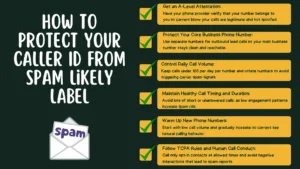
Number one, you’ve got to strive for an A- level attestation. This is the most important part of protecting your caller ID against spam likely labels, and this is the action you need to take today. In an A-level attestation, phone service authenticates the phone number and the caller. It confirms that the number belongs to you and that the call is not spoofed.
Without A attestation, carriers treat your calls with more suspicion, and that alone can lead to “Spam Likely” labels even if everything else looks normal.
You have to contact your phone service provider whether it’s Twilio, Dialpad, RingCentral or any other platform and ask them how to get an A-level attestation. Some providers require forms and verification, while others handle it automatically once your number is properly registered.
Protect Your Core Business Phone Number
Your core phone number is your website number, your business card number, and your email signature number.
For outbound lead calls; do not use your core number. Because if it gets flagged you won’t be able to contact your already existing customers and clients and they want to reach out to you in case they need any assistance. Instead, use separate phone numbers only for lead dialing, and forward those numbers to your core phone number. That way, your main number stays clean even if a dialing number starts taking hits.
Control Daily Call Volume
Making too many calls from a single number can get you flagged quickly. What we’ve found is that 60 to 80 calls to certain carriers like AT&T or T-Mobile can be enough to trigger spam signals.
A good rule of thumb is to keep dials under 100 per day per number. Once you dial 100 numbers using that particular phone number, rotate to another phone number.
Maintain Healthy Call Timing and Duration
Maintaining an average call time of around 15 seconds helps. Lots of extremely short calls; especially unanswered ones signal low engagement and raise spam risk.
Ringless voicemail and triple dialing can hurt you if you’re doing them excessively and not actually reaching people. Long conversations balance things out, but if most calls end quickly or never connect, that pattern can work against your caller ID.
Warm Up New Phone Numbers
Warm up new phone numbers. Don’t go from zero to hundreds of dials immediately.
Make a few calls the first day, increase gradually over several days, and build toward higher volume. That steady ramp-up helps establish a healthy calling pattern and lowers your chances of being flagged.
Follow TCPA Rules and Human Call Conduct
You must comply with TCPA laws. Don’t call early, don’t call late, and don’t call past 90 days. Always make sure you’re calling on opt-in data. Carriers can see timestamps and patterns, and violations feed directly into spam scoring systems.
And finally, don’t be a jerk. If someone gets upset, they can mark you as spam through apps or directly through their carrier. Once that happens, your number can get flagged fast.
How to Monitor Spam Likely on Your Caller ID
Now let’s get into the actionable stuff: how to monitor your caller ID.
Every single agent should be monitoring their numbers daily. If you’re flagged and you don’t know it, you’re wasting your resources. You’re putting full effort and time by making calls, but your contact rates are static and even declining.
Using Number Verifier for Carrier-Level Visibility
To monitor spam likely labels, use Number Verifier. It gives you a daily email telling you if you’re flagged as spam. That way, every morning you know exactly where your numbers stand and whether you’re showing up as Spam Likely.
It’s inexpensive and works out to a low monthly cost for monitoring multiple phone numbers. You get long-term monitoring, and for what it protects, that’s cheap.
Checking Numbers Before Using Them
You can also check numbers before selecting them. Type phone numbers into Number Verifier before you ever start calling and see if they’re already marked as spam across AT&T, T-Mobile, and Verizon. That way, you’re not starting with a number that’s already burned.
How to Remediate a Spam Likely Caller ID Flag
Now let’s discuss the important part: how to remediate a flagged caller ID.
When to Discard a Phone Number
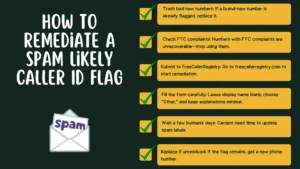
If it’s a brand new number and it already has a spam flag, trash it and start fresh. Don’t waste time trying to fix a number that hasn’t even been used yet.
If there’s an FTC complaint tied to the number, trash it. That one is unrecoverable. You’re dead in the water, and you shouldn’t make calls from that number anymore.
if you get a spam flag go to freecallerregistry.com. it reports to Hiya First Orion and TNS which are used by AT&T T-Mobile and Verizon.
Submitting a Removal Request via FreeCallerRegistry
If you get a Spam Likely flag, go to freecallerregistry.com. It reports to Hiya, First Orion, and TNS, which are used by AT&T, T-Mobile, and Verizon to decide whether a number shows up as Spam Likely. Free Caller Registry submits your information to all three at the same time.
Fill out the FreeCallerRegistry form correctly.
- Leave the display name blank. Don’t put your business or agency name there.
- Choose “Other” instead of financial services. Even if you’re in insurance or financial services, choose “Other.”
- Use minimal explanation language. In the feedback section, say you’re erroneously mislabeled as spam, but don’t overload it. The more you add, the more you confuse the analytics engine.
What to Do If the Flag Is Not Removed after Remediation
Wait up to three business days. Some carriers resolve it faster, some take a bit longer. If it’s still not removed, go directly to Hiya, First Orion, or TNS and register there.
Free Caller Registry removes about 75 percent of spam flags if done correctly. The rest should be removed through the analytics engines. If it’s still not fixed after that, get a new phone number.
FAQs about How to Monitor, Protect, and Remediate “Spam Likely” on Your Caller ID
1. What does “Spam Likely” mean on caller ID?
Spam likely means that the phone carriers or service providers like AT&T, Verizon, or T-Mobile have run call authentication and call verification processes on your number and marked it suspicious because of irregular call behavior and many other reasons. Now when the call is forwarded to the recipient, a spam label appears with the number.
2. Can a legitimate business number still be marked as Spam Likely?
Yes. A call can be fully authenticated and still be labeled Spam Likely if the behavior or reputation of the number raises concerns due to high call volume, low answer rates, missing A-level attestation, consumer spam reports, or inconsistent calling patterns.
3. Does STIR/SHAKEN prevent Spam Likely labels?
No. STIR/SHAKEN only verifies that a call is not spoofed. STIR/SHAKEN does not guarantee safety. A call can be fully authenticated and still be labeled Spam Likely if the behavior or reputation of the number raises concerns. Authentication proves identity, it does not prove intent.
4. How do I know if my phone number is flagged as Spam Likely?
You can also check numbers using the Number Verifier. Type phone numbers into Number Verifier and see if they’re already marked as spam across AT&T, T-Mobile, and Verizon.
5. How can I remove a Spam Likely flag from my caller ID?
If you get a Spam Likely flag, go to freecallerregistry.com. It reports to Hiya, First Orion, and TNS, which are used by AT&T, T-Mobile, and Verizon to decide whether a number shows up as Spam Likely. Free Caller Registry submits your information to all three at the same time.