
In this blog, we will try to understand what bulk API is, in which scenarios you should use it. How the bulk API is different from the other APIs that Salesforce offers like the rest API. We’ll also try to understand what is the difference between the bulk API 1.0 and the 2.0
Now, before we even go and deep dive into what the Bulk API is, let’s try to understand the common challenge that we always have whenever we are working with Salesforce, and that is large data volume. In Salesforce, whenever we are trying to deal with large data volumes, we always come across the governor limit.
The governor limits are nothing but the guardrails that Salesforce has provided to make sure that things are stable in the multi-tenant environment and are working within the limits.
Now, let’s take one scenario. For example, you have to perform data operations on millions of records, and you have to do this with the help of integration.
Most of the time, we choose the REST API without much thought process. So, if I go with the REST API, what will be the challenges I will face?
Before that, let’s have a quick understanding of what REST API is.
REST API always works in a synchronous way, and it immediately provides the response.
The main challenge is that, although the REST API is very fast and responsive, performance bottlenecks will appear if you perform operations with mass data. And that’s where Salesforce Bulk API fits and performs everything seamlessly.
Explore More: Salesforce Open CTI: Step-by-Step Setup Guide for Call Center Integration
What Is the Salesforce Bulk API?
As already discussed, the challenge with respect to the large data volume can be solved with the help of the bulk API. So what is bulk API?
It’s a REST based API but it’s not the REST API. Bulk API is also based on the REST architectural style. Moreover, it is asynchronous, which means you will not get the immediate response as soon as you send the request. It always runs in the background. It is designed to load or delete large data sets efficiently.
With it, we can perform all the different types of operation like the update, delete, insert, update or upsert. Moreover, you can also perform the export operation with the help of the bulk API.
How does the bulk API work?
Bulk API performs the operations asynchronously in the background while you keep doing your normal tasks. Using Bulk API, you can submit multiple requests at one time and then either wait or perform other routine tasks. The results of your requests will be available once all the requests have been processed.
Typically the rest API is a good option if you have to process more than 2,000 or more records. Salesforce recommends that rather than using the REST API to process 2,000 records, you should definitely leverage the bulk API as it supports operations like insert, update, upsert, delete. Moreover, with the help of query, you can also export the records as well.
Read More About: What Is API Integration with Salesforce? Concepts, Types, and Examples
Key Characteristics of the Bulk API
The process to use the Bulk API is very simplified. Although there are multiple steps that need to be followed, the steps are simple. So ease of use is a crucial feature. Now, let’s go through its other key characteristics!
Asynchronous Processing
The first one that we already discussed it’s an asynchronous like your rest API which is synchronous and provides the immediate response. Bulk API runs the requests in the background. Once you submit your request, it will return you the job ID. But with the help of this job ID you can come back and always check the response.
Restful
The second thing is it is restful. Restful means it is based on the REST principle, which makes this API more approachable. REST is an architectural style. There are principles based on this architectural style like statelessness, Client–Server Separation, Resource-Based URLs, Standard HTTP Methods, Uniform Interface, etc.
Automatic Batching
The third one is the automatic batching but it is possible with Bulk API 2.0. In Bulk API 2.0, you simply send the large data file to the Bulk API. Bulk API breaks this large data file into smaller batches. So if you are sending one big CSV file, Salesforce automatically handles breaking it down into appropriate internal batches for processing.
Optimized for Large Data Volume
It is optimized to handle the large data volume. As it is optimized to handle the large data volume, it bypasses the standard API governor limit, which is always a bottleneck or a throttle whenever you are dealing with the REST API calls. So the governor limits are on a much higher side whenever you use the bulk API.
Bulk API 1.0 vs Bulk API 2.0
Let’s distinguish between Bulk API 1.0 and Bulk API 2.0.
The first thing is the simplicity and the batch management. The biggest difference is that in version one; as an admin, or a developer or an architect, you cannot send data in bulk; rather you are responsible to send the smaller and appropriate batches to the bulk API for the processing.
But with the bulk API 2.0, that part has been completely removed. You can send the large file directly to the bulk API and the Salesforce will do all the internal batching for you. This dramatically reduces the complexity of the client side integration logic where you don’t have to go and parse and send data in smaller batches.
Moreover, the error handling part is also quite simplified. In the case of version 1.0, since multiple batches are submitted based on the smaller chunks of data, you get the separate success and the failure files for each batch.
However, in the case of 2.0, Salesforce creates internal batches automatically and creates one consolidated success file and one consolidated failure file for you.
Complexity wise, Version 1.0 is more complex to configure and ease wise, Bulk API 2.0 scores higher compared to Bulk API 1.0.
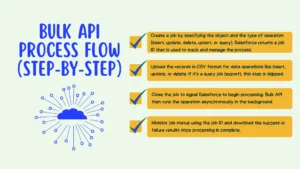
Bulk API Process Flow (Step-by-Step)
While you are using the bulk API from the setup perspective, you have to go through the different stages. Let’s go through all these stages that you have to go for.
Step 1: Job Creation
Step number one, you have to create the job. For that, you will send the request for job creation. In the create job step, you inform Salesforce what type of data and what type of operation you are performing, on which object you are performing operations, are you inserting or deleting or querying . You have to specify the object and the operation while creating the job. When you create the job it returns you the job ID. With the help of a job ID, you can monitor the status of that job and retrieve the result to validate what has been processed and what has failed.
Step 2: Uploading Data
The second step is uploading data. If you are importing data, you send a CSV file containing all your records to Salesforce. If it’s a query job, you can skip that step. Query job means exporting the record. But if you are performing operations on Salesforce records, this step is required and is referred to as the injection step.
Step 3: Closing the Job
The third step is closing the job. This is the most critical stage because it signals Salesforce that the upload operation is completed and processing can start. For query jobs, this step happens automatically. You do not have to do anything. Since Bulk API runs in the background, you can monitor the status of the job using the job ID. The status of the job appears as: in progress, completed, or failed.
Step 4: Result Retrieval
The last step is getting the results of the job. This means checking which records succeeded and which records failed. You can also download the results in a CSV file containing your queried data. If you are making an export request, this is the step where you download the queried records.
Typical Use Cases When You Should Go for the Bulk API
The typical use cases when you should go for the Bulk API are when you have to cleanse the data, for example, update records, delete existing old records, or perform archival operations on a large number of records. In these cases, Bulk API is the go-to option.
If you have to perform the ETL processes, which involve high volume of data and complexity, then you should go for the Bulk API.
Data migration is another common scenario where people use the Bulk API to move data from one system to another. If the data is in the millions, then you should go for data migration using the Bulk API.
The last one is mass data update. Mass data update means performing operations on a large number of records. Whether the operation is insert, update, delete, upsert, or export of a large number of records, Bulk API is the option to go for.
Decision Framework: REST API vs Bulk API
Whenever the volume of records you have to deal with is in the range of 200 per call or 2,000 within a day, then you should go for the REST API.
If the volume of records is in thousands to millions within a day, then you should go for the Bulk API.
If you want an immediate response, then you should go for the REST API. If you are okay to wait for the response, then a synchronous API is the one you should go for.
One of the major reasons people use the Bulk API is for data migration or mass data updates. But if based on UI interactions you have to make updates to the data, then REST API is the go-to option.
With respect to governor limits, standard API limits are applicable for REST API. However, Bulk API limits are higher compared to REST API.
Complexity wise, REST API is simpler when dealing with a smaller set of records or a single record at a time. But if the number of records is high, then you should go for the Bulk API. Setup wise, it is complex because there are multiple steps to configure the Bulk API. REST API is simpler when it comes to setup.
Error feedback is immediate in REST API because it is synchronous. As soon as you submit the request, you get the response.
In the case of Bulk API, once all the batches have been submitted, you get one consolidated file with the success and failure details.
To simplify, if you are making an individual phone call for immediate and small interactions, then REST API is the go-to option. But if you have to send large data and process large interactions, then Bulk API is the better option to go for. Both are essential, but knowing when to use which one is important.
When Should a Call Center Use Bulk API
Now that being said, you might be thinking how the bulk API is relevant in a call center setup. In most call centers, especially when you are doing outbound calling or you are dealing with support at scale, one common thing that always comes in your way is the large data volume.
In a call center, you are not just dealing with a single record at a time. You are dealing with thousands to millions of leads, contacts, cases, call logs, dispositions, follow-ups, and campaign updates. And whenever you are trying to deal with this kind of large data volume inside Salesforce, you can hit the governor limit. That is the same challenge we discussed earlier if you choose the wrong API.
Now let’s take one scenario. For example, You have to perform updates on the millions of records coming from a dialer or a CTI system. For example, every call creates outcomes like connected, no answer, busy, voicemail, wrong number, callback requested, do not call, and so on. If you try to push all of these updates one by one using the REST API, it will work till a certain limit. But as soon as the volume increases, the performance bottlenecks will come and you can start consuming API limits very fast.
If you are doing campaign imports, data migration of call history, mass updates of call dispositions, or even cleansing the lead data before the next calling cycle, bulk API becomes the go-to option.
At the same time, REST API still has its place in call centers. If you want immediate response, like when an agent is on the call and you want a quick screen pop, quick record fetch, or quick single record update, then REST API is the go-to option. But if you are okay to wait for the response and you have to process thousands to millions of call center records within a day, then bulk API is the better choice.
And that’s why as a developer or an architect working on Salesforce call center integrations, you have to always consider the requirement first and then make the call whether you should go for REST API, bulk API, or any other API like the streaming APIs, because directly using REST APIs for all the call center business requirement can create the same million dollar mistake where governor limits are hit, API limits are consumed, and the system performance goes down.
FAQs about Salesforce Bulk API
1. What is the difference between Salesforce Bulk API 1.0 and 2.0?
With the bulk API 2.0, you can send the large file directly to the bulk API without parsing whereas in case of Bulk API 1.0, you have sent data in chunks.
Moreover, the error handling part in version 2.0 is also quite simplified. In the case of version 1.0, you get the separate success and the failure files for each batch. However, in the case of 2.0, Salesforce creates one consolidated success file and one consolidated failure file.
Complexity wise, Version 1.0 is more complex to configure and ease wise, Bulk API 2.0 scores higher compared to Bulk API 1.0.
2. How does the Salesforce Bulk API help avoid governor limit issues?
Salesforce Bulk API is optimized to handle the large data volume. As it is optimized to handle the large data volume, it bypasses the standard API governor limit, which is always a bottleneck or a throttle whenever you are dealing with the REST API calls. So the governor limits are on a much higher side whenever you use the bulk API.
3. How does the Salesforce Bulk API process work?
Step number one, you have to create the job. For that, you will send the request for job creation. After that, you have to upload the data. You can upload the data at one time or into multiple batches. Once you close the job, you are signaling the Bulk API to start processing that data, and then you can monitor the status of the job.
4. Why is Salesforce Bulk API important for call centers?
In a call center, you are not just dealing with a single record at a time. You are dealing with thousands to millions of leads, contacts, cases, call logs, dispositions, follow-ups, and campaign updates. And whenever you are trying to deal with this kind of large data volume inside Salesforce, you can hit the governor limit. So, Bulk API helps call centers perform all high volume data tasks smoothly without hitting the API limit.