
In this blog, we will discuss:
- What Is CTI and Why Call Centers Use It
- Benefits of CTI for a Call Center
- What Is Salesforce Open CTI
- Salesforce Open CTI Architecture
- Benefits of Salesforce Open CTI
- What We Can Do With CTI in Salesforce
- Vendor vs Open-Source Telephony Tools: Which Is Better for Salesforce Open CTI?
- Steps to Integrate Open CTI in Salesforce
- How Does Open CTI Support Omni-Channel Contact Centers?
- How CTI Works in a Real Contact Center Scenario
- FAQs about Salesforce Open CTI
What Is CTI and Why Call Centers Use It
CTI stands for computer telephone integration.
Take an example of a company with a call center where many customers are calling. Most companies are also integrating chatbots on their websites. If a customer is discussing something in your chatbot system and wants to connect to a real agent instead of a chatbot, and your system is not having agent integration with the chatbot, they will not be able to directly move their interaction. The chatbot is not able to directly move their call to the agents. The customer will not be happy because the chatbot cannot transfer the call directly.
Another problem is if the chatbot tells the customer to call a number, then the customer has to start the call again and repeat whatever discussion was done with the chatbot.
A third problem is when the customer calls the provided number and the agent asks basic information to identify the caller. Every time the customer calls, they have to give that basic information before the agent can help. Sometimes even after giving basic information, the agent says they are not able to connect with the system and asks to call again later.
This happens because there are two systems: one is the telephony system and the second is the CRM system. When the agent searches the information in the CRM and it is slow or not working, the customer experience becomes negative. If there is a good competitor providing the same services, customers may switch to that competitor.
Instead of negative feedback or losing customers, you should go with another channel where they can seamlessly move their interaction across different channels like chatbot, web chat, CTI calls, and online services. Ideally, whenever interaction happens in one system, the other systems should also get that information. This kind of system is called Omni Channel. Multi Channel engages customers, and Omni Channel gives better customer experience. Multi Channel is for engagement, and Omni Channel is for customer experience.
If you want to go with a seamless experience, you have to install a CTI tool. CTI stands for computer telephone integration, which connects two systems: the computer (CRM application) and the telephone system. This integration is called CTI. Most call centers have large amounts of incoming calls, so they implement computer telephone integration. Without it, you have to manage inbound and outbound calls manually. With CTI, a system handles monitoring, incoming calls, who attended which customer, and interactions.
Call centers can implement CTI to use computers to manage all telephone consoles. Routing, rerouting to other agents, and managing instructions can all be done using the CTI system. That is why CTI is important.
Benefits of CTI for a Call Center
There are many advantages of CTI for call centers, let’s have a look at them!
1. Advanced Phone Control
Benefits of CTI include advanced phone control. You don’t require a physical phone; you can use Lightning Dialer in Salesforce or similar systems. Agents can control calls directly from the computer, route to other agents or managers, and supervisors can monitor performance.
2. Intelligent Call Routing
Intelligent call routing using skill-based routing is possible. Calls are routed based on skill sets, improving customer experience.
3. Caller Authentication
Caller authentication is improved. Instead of asking for basic information every time, you can map the customer’s mobile number with the CRM. When they call, their information is automatically fetched. This saves time and cost.
4. Automatic Screen Popup
Automatic screen popup shows incoming call details.
5. Data Recording
Data recording ensures all customer interactions are stored.
6. Call Monitoring
Call monitoring can be used for audit purposes.
7. Automatic Dialing
Automatic dialing allows outbound calls directly from Salesforce without physical phones, and tasks are automatically created in the system.
What Is Salesforce Open CTI
We have discussed CTI. Now if you want to integrate CTI in the Salesforce system we need open CTI which is a JavaScript API. This JavaScript API will help us to integrate any third party computer telephone integration system with Salesforce.
With open CTI we can make calls with a soft phone directly inside Salesforce and we don’t require a specific CTI adapter.
CTI integration in Salesforce can be done in two ways:
- using Open CTI
- using provider-specific tools.
Provider-Specific Tools
Provider specific CTI tools are specific to providers like Twilio Flex, Nice in Contact, Amazon Contact. They have specific driver adapters and integrate based on that adapter only. With a specific service provider API every call is routed through an adapter and you have to install a desktop application. Adapter is installed for specific Salesforce API versions. If the API version changes, the adapter may not work and has to be updated.
Open CTI
In an open CTI tool a single CTI application can work with all third party systems. Open CTI tool is browser based, JavaScript is used for integration. No third party adapter is required. It can create a customizable soft phone like a popup screen where you can dial a number. You can customize UI like inbound call prompt showing gold customer, saving disposition, callback location. It is browser specific and no platform specific code is required. A single code base will work for all third party systems.
Salesforce Open CTI Architecture
Salesforce Open CTI consists of three main components which work together as an integrated system. These three components are:
- Telephone system: Telephone system that can be on-premise or cloud telephony. Phone calls are received and transmitted through this system.
- Agent Interface: The agent works online using a web browser like Chrome or Edge. They log into Salesforce to do their daily work. Inside Salesforce, there is a small phone panel called a softphone. Instead of using a physical desk phone, agents use it to make calls.
- Salesforce application: This is the CRM system where customer data is stored, cases are created, and activities are tracked
Phone calls are received and transmitted through this system. This system is connected to the agent’s browser via Open CTI adapter or provider specific tool. Whenever a call comes in or goes out, the browser communicates with Salesforce (CRM), retrieves information about the call and shows it to the agent for easy navigation and excellent service.
Benefits of Salesforce Open CTI
Open CTI implementation uses HTTPS protocol so interaction is secure and very few chances of security breach. Moreover, all interactions are done using asynchronous calls so you can do other activities while the system can process call information in the background. No specific desktop CTI adapter is required because the cloud based default adapter will work.
What We Can Do With CTI in Salesforce
The features can be separated into three categories. This is not complete. It is just a highlight of the most common type of features that are available today. There are certainly more, and each product has some special features that it highlights and where it stands out in each of the categories. This list is supposed to give a starting point and common ground to compare the offerings that are available in the market.
1. Standard CTI Features
The standard features are simple screen pop and click to dial. These are commodity features because everyone does a simple screen pop and click to dial.
Simple screen pops refer to just popping the contact information for a phone number that the customer is calling from.
2. Advanced CTI Features
When dealing with more advanced features, that’s where the different products are already starting to differentiate. For example, configurable screen pop data. Simple screen pops are based on just the phone number, but in advanced environments you can configure what data inputs a screen pop should be based on.
If a customer calls in and all I have is the phone number, then use that phone number for the screen pop. If the phone number exists in Salesforce, pop the contact or a lead, and if it doesn’t exist maybe screen pop a form to create a new record. But what if the call was about a specific case and the customer actually provided that case number? Then you would want the screen pop to actually pop that case. The most specific piece of information should always be the entry point for the conversation since the agent can easily navigate to all related records such as their contact or account from there.
Call activity records are most commonly created by all soft phones when the call ends. What you often want, however, is a little bit more flexibility in the way how they are being created, maybe even select specific fields from the phone call that can be mapped to custom fields.
Accessing call recordings right out of Salesforce is also considered an advanced feature, as many applications require users to log into the contact center platform to access those recordings.
3. Fully Integrated CTI Capabilities
Fully integrated solutions are able to perform queries and data modifications right from the IVR. One important aspect is that the platform is capable of creating a new record and to pass on the ID of that newly created lead, contact, or case for the screen pop.
Two-way data access means the soft phone can display the data that is coming from the contact center platform as attributes of the call, and vice versa the agent should be able to provide details about the work, for example the number of cases that she created, which could be attached to the call so that another agent could have access to the information or that it could be reported on.
Post call actions help workflows and processes to save the agent’s time to get ready for the next call. Supervisor functionality allows call center supervisors to view in Salesforce what the status of each agent is, how many calls are waiting in the queue, and other statistics. Ideally the supervisor also has the ability to listen into a call and possibly coach the agent.
With the technology improvements in artificial intelligent, it is now possible to have full transcripts of phone calls being created either in real time or at the end of the call. The benefit of this is that you can search the information and read it post-mortem, not just the information but the conversation, without actually needing access to the call recording.
Vendor vs Open-Source Telephony Tools: Which Is Better for Salesforce Open CTI?
For call center setup, companies companies prefer market leading paid telephony vendors like Amazon Connect, Twilio Flex, Nice in Contact (NICE CXone), and Genesys Cloud because they offer security, official support and SLA, regular updates, and compliance (TCPA, GDPR, HIPAA, etc.). They usually require license fees and contract agreements but are reliable and provide professional support especially to large organizations.
On the other hand, open source and community-supported tools like Asterisk (open-source PBX), demo CTI adapters, and self-hosted telephony solutions are flexible with least initial cost but they provide limited official support and less enterprise compliance.
With salesforce open CTI, you can integrate any third party vendor whether open source or market leader with the same call center definition file architecture. Adapter detail belongs to a specific third party system but basic concept and architecture remain same.
Steps to Integrate Open CTI in Salesforce
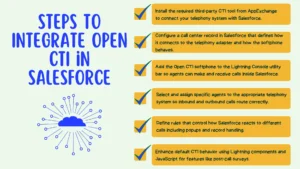
For integrating an open CTI in the system, you have to follow the following steps:
1. Install and Deploy the Managed Package
First is to install and deploy a managed package, whatever tool you want to integrate in your salesforce system like nice in contact, Twilio Flex, Amazon Connect. You have to first install that product.
Whenever we install any specific third party system using the AppExchange product to your CRM system. It actually installs a default CTI adapter in our Salesforce system. That CTI adapter gives a contact control panel where they will do all the CTI integration with the Salesforce system. Related features like when an inbound call comes, how to show a popup or if you want to go with an outbound call, from where you can do it. All those things are done via CTI integration.
2. Create the Call Center Definition File
After that you have to create a call center definition file. This definition file has all the information like to which system Salesforce will connect when you get a call. Either it should connect to Amazon, Twilio Flex or any other system.
The Call Center definition file contains adapter details, authentication details, security related things, what is the height of the dialer screen you want. Every detail we put in the call center definition file tells Salesforce how to connect to the telephony system and how the softphone should behave.
Instead of manually creating all settings manually, you can create the Call Center Definition File by using the Import option in Salesforce. By using import functionality, you upload a file usually in XML format that already contains all the required integration details.
3. Add Open CTI Softphone to the Console
The agent needs a visible place inside Salesforce to see incoming calls, dial outgoing numbers, and control call actions. For that you have to add the phone utility/softphone to the console application. You can do it using the lightning service console app. You have to add that telephone system in your utility bar.
After you create the Call Center Definition File, the next step is to connect it to the softphone that is virtual phone panel that appears inside Salesforce
Once everything is connected properly, a phone field appears when you open any account record. That phone number is clickable. You do not need to manually dial the number. You can simply call by clicking on the phone number, and Salesforce will automatically start the call.
All of this functionality comes automatically once the CTI software is installed and configured correctly.
To add the Open CTI softphone:
- Go to App Manager.
- Open your Console Application (like Service Console).
- Go to the Utility Items section.
- Add Open CTI Softphone.
- Set properties such as label name, panel height, width etc.
- Enable Start Automatically so it loads when the console opens.
After that, you need to choose which user profile can use the softphone. For the demo, a System Administrator profile can be used but in a real project, you should create an Agent-specific profile or permission set and assign it properly.
4. Assign Users to the Call Center
In case of incoming or inbound calls you need to decide which agent will handle that call. For this purpose you assign specific users to the call center. In case salesforce is connected to multiple telephony systems like Amazon Connect or Twilio Flex, you first have to define users to specific systems. For example, some agents may use Amazon Connect, and others may use Twilio Flex.
If you have many agents, you also need to decide which agent will handle which customers. This setup is done in the contact center definition screen.
When you click the Manage Call Center Users button, a user selection screen opens. From there, you can choose which users will serve specific customers.
5. Configure Softphone Layout and Screen Pop Settings
Using CTI software, you can also override the standard settings with your own rules like what the system should do when an inbound call will come or agent outreach prospects. For example I have called using my registered number. As soon as my call goes to the system and the agent accepts that request, automatically the account page should open or a new case should be created. That case should have some basic information or case should be attached to the account object. You can do this type of customization through the software.
For each type of call: internal, inbound and outbound: we define a set of rules called call behavior guide that tells Salesforce how to react. For example, when a system receives an inbound call, Salesforce can show an inbound call notification. It can play a default ringtone and show screen popup. If no matching record is found, the system creates a new case. If a match is found, the system opens the detail page of that object. And in case of outbound calls, the system may automatically log the activity or it may open the related record. All these settings can be done using softphone layouts.
6. Advanced Customization
Beside default features, you can do additional customization using lightning component and JavaScript. These features can be tracking the reason why an agent declines a call, opening a separate survey screen after inbound call finish and much more. There are many such features that you can incorporate in your system using salesforce open CTI.
After completing the technical setup, let’s understand how this integration improves the overall customer experience.
How Does Open CTI Support Omni-Channel Contact Centers?
Contact center is a hub for managing customer communication and customer services because companies have multiple channels for contact like phone, email, live chat and social media.
All these channels handle customer interactions and whatever and wherever the interaction is done; it should come in the contact center.
As agents connect with a single customer of prospect via multiple channels so they should have a proper system that can connect with all these channels easily. If the person is doing live chat and from live chat you want to go to the phone, that interaction should seamlessly go to the second channel from the first one. For that we need an omni channel experience.
Using Open CTI integration inbound call, outbound call, SMS and web chat all can be handled.
How CTI Works in a Real Contact Center Scenario
Take an agent who is starting a shift. She signs into Salesforce, which immediately loads the service console, and the Lightning interface at the bottom left, the CTI widget, is starting up, immediately logging in to the account but marking the status as offline.
The agent is a blended agent, so she actually handles emails from time to time using Salesforce omni-channel, which is also currently set to an offline status.
Meanwhile, a customer is having issues with an internet connection and decides to call the cable provider. When the call arrives in the IVR, it checks to see if the customer has any open cases. If there is no open case, the IVR asks to provide a brief summary about the issue that is being called about. The IVR then creates a case with a transcription of the issue in the description field, and the ID of that case is attached to the call for a screen pop later.
When the agent is ready to take the first interaction, the status is set to available in the soft phone, which also makes the agent available in omni. The phone starts ringing. This will put omni into a busy status, and for the incoming call, because the phone call had a case ID attached, the case pops showing the description that was provided.
The agent greets the customer by name and confirms the issue description that was provided in the IVR, creating a very personalized experience. As it turns out, the customer may need to get a modem replaced, so the agent creates a service request for site visit and adds the work order number to the phone call, which will be helpful for reporting purposes.
Since this is all that can be done today, the customer hangs up the call. A phone call task is created in Salesforce under the account, and that task is screen popped to the agent to provide some final details. Once done, the agent closes the tabs for the call and sets the status back to available.
Those features can enable a rich experience for both the customer and the agent. This is a very sophisticated example that not every contact center needs to provide in this depth. However, the functionality and capabilities are available today, so all of this can be accomplished with the right tools.
FAQs about Salesforce Open CTI
1. What is Salesforce Open CTI?
Salesforce Open CTI is a JavaScript API. This JavaScript API helps us to integrate any third party computer telephone integration system with Salesforce. With open CTI we can make calls with a soft phone directly inside Salesforce and we don’t require a specific CTI adapter.
2. How does Salesforce Open CTI improve call center efficiency?
Salesforce Open CTI supports all the features of modern AI call centers like call routing, screen popups, caller identification, and case creation. All these features reduce manual job responsibilities of agents that are usually iterative and tiring tasks. Salesforce Open CTI let agents focus on complex issues more intuitively thereby improving call center efficiency
3. Can Salesforce Open CTI integrate with Amazon Connect or Twilio Flex?
Yes, With salesforce open CTI, you can integrate any third party vendor whether Amazon Connect or Twilio Flex with the same call center definition file architecture. Adapter detail belongs to a specific third party system but basic concept and architecture remain same.
4. What is the difference between Open CTI and provider-specific CTI tools?
Provider specific CTI tools are specific to providers like Twilio Flex, Nice in Contact, Amazon Contact. They have specific driver adapters and integrate based on that adapter only. With a specific service provider API every call is routed through an adapter and you have to install a desktop application. Adapter is installed for specific Salesforce API versions. If the API version changes, the adapter may not work and has to be updated. Whereas in an open CTI tool a single CTI application can work with all third party systems. Open CTI tool is browser based, JavaScript is used for integration.